This article may include affiliate links that earn us a small commission at no extra cost to you.


Best iPhone 17 Controllers: Bluetooth & USB-C Picks
Disclaimer: This website may contain affiliate links. If you purchase through these links, we will receive a small commission at no additional cost to you. We want to be transparent about this.
Last Updated:
This guide compares controllers for iPhone 17, iPhone Air, iPhone 17 Pro, and iPhone 17 Pro Max. Apple lists an A19 chip in the iPhone 17 and A19 Pro chips in iPhone Air and iPhone 17 Pro, but controller support still depends on the game, service, and hardware fit.
Phone 17 controller comparison
| Controller | Connection | Best fit |
|---|---|---|
| GameSir G8 Plus | Bluetooth | Long sessions with full-size grips |
| 8BitDo Ultimate Mobile Gaming Controller | Bluetooth | Custom controls and back paddles |
| GameSir G8 Galileo | USB-C | Wired gaming; confirm iPhone 17 fit before buying |
| Razer Kishi Ultra | USB-C | Large grips; confirm iPhone 17 fit before buying |
| Backbone One USB-C (2nd Gen) | USB-C | Wired mobile gaming and a compact setup |
1. GameSir G8 Plus: Bluetooth controller with full grips

The GameSir G8 Plus helps turn the iPhone 17 series into a true handheld gaming system. Instead of using touchscreen controls, gamers get real buttons, thumbsticks, and comfortable grips that make games easier and more fun to play. The larger design is also more comfortable to hold during long gaming sessions, and it keeps your fingers from blocking important parts of the screen.
The GameSir G8 Plus is useful for more than just mobile games. It works with Apple Arcade, Xbox Cloud Gaming, PlayStation Remote Play, Steam Link, and many popular emulators. It can also connect to other devices like tablets, PCs, and Nintendo Switch systems. For gamers who want to get more out of their iPhone 17 series, the GameSir G8 Plus adds better controls, more comfort, and access to even more games wherever they go.
| Pros | Cons |
|---|---|
| Comfortable grips make long gaming sessions easier on your hands | Larger than a standard phone grip and takes up more space in a bag |
| Real thumbsticks and buttons feel better than touchscreen controls | Some mobile games do not support controllers |
| Hall Effect sticks help reduce the chance of stick drift | Needs to be charged separately from your phone |
| Works with the entire iPhone 17 series through Bluetooth | Bluetooth can add a small amount of input delay compared to wired controllers |
| Supports Apple Arcade, cloud gaming, remote play, and emulators | More expensive than basic mobile controllers |
| Keeps your fingers off the screen for a clearer view | Not everyone likes carrying a controller when traveling |
| Can also be used with tablets, PCs, and Nintendo Switch systems | Setup may take a few minutes for some apps and games |
| Two programmable back buttons add extra control options | Some features may require the GameSir app to customize |
Verdict: If you play games often on your iPhone 17 series of smartphone, especially Apple Arcade, Cloud Gaming, or Emulators, the GameSir G8 Plus offers a big upgrade in comfort and control. If you only play casual mobile games occasionally, the extra cost and size may not be worth it.
Note: Confirm controller support on the game’s App Store page before buying for one specific game.
2. 8BitDo Ultimate Mobile Gaming Controller: more control options

The 8BitDo Ultimate Mobile Gaming Controller feels familiar from the moment you pick it up. Instead of copying the compact design used by many mobile controllers, it borrows ideas from full-size console controllers, with comfortable grips, responsive buttons, and extensive customization options. The result is a controller that feels less like a phone accessory and more like a natural extension of your gaming setup.
Another standout feature is customization. With 8BitDo’s software, gamers can remap buttons, adjust stick sensitivity, create controller profiles, and assign actions to the two back buttons. The controller also includes Hall Effect thumbsticks, which are designed to help reduce stick drift over time. For gamers who want more than a basic mobile controller, the 8BitDo Ultimate Mobile Gaming Controller offers a more polished and customizable experience that can grow with their gaming needs.
| Pros | Cons |
|---|---|
| Premium build quality that feels closer to a console controller | Larger than playing with just a phone |
| Hall Effect thumbsticks help reduce stick drift | Some mobile games do not support controllers |
| Two programmable back buttons for extra controls | Needs to be charged separately |
| Custom button mapping and controller profiles | More expensive than many basic mobile controllers |
| Comfortable textured grips for long gaming sessions | Bluetooth can add a small amount of input delay |
| Great for Apple Arcade, cloud gaming, and remote play | Not as pocket-friendly as smaller controllers |
| Familiar layout for console and PC gamers | Some customization features require the 8BitDo app |
| Can be used with other compatible devices | Adds another device to carry while traveling |
Verdict: The 8BitDo Ultimate Mobile Gaming Controller is a strong choice for gamers who want a controller that feels closer to a real console experience. Its high-quality design, customizable controls, and Hall Effect thumbsticks help it stand out from many other mobile controllers. If you play regularly on your iPhone 17 series, especially with Apple Arcade, cloud gaming, or remote play, it offers features that can make gaming more comfortable and enjoyable.
3. GameSir G8 Galileo: wired play with a fit check
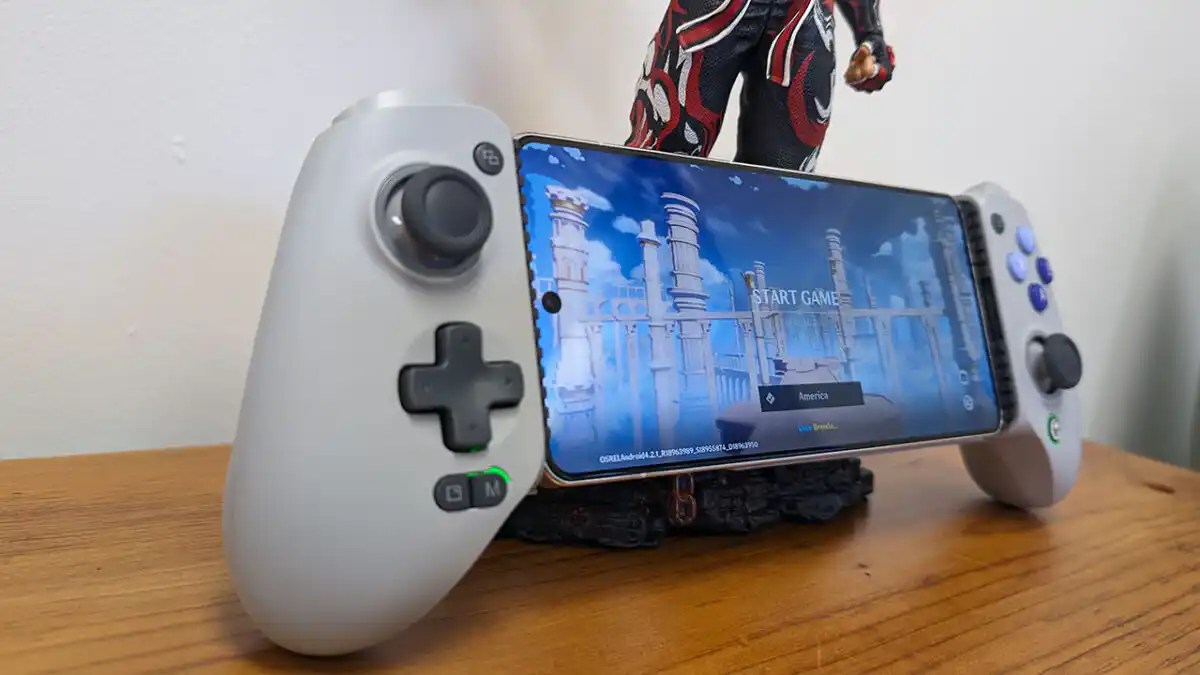
Speed is one of the biggest reasons to consider the GameSir G8 Galileo. The controller connects directly to the iPhone 17 series through USB-C, removing the need for a Bluetooth connection and helping keep controls fast and responsive. Combined with passthrough charging, Hall Effect controls, and programmable back buttons, it focuses on the features that matter most during long gaming sessions.
What really makes the G8 Galileo stand out is its focus on serious gaming. It includes two programmable back buttons, swappable thumbstick caps, and hair-trigger mode for faster reactions in shooters and racing games. Because it draws power directly from your phone, you never have to remember to charge the controller. If you spend a lot of time playing Apple Arcade, cloud gaming services, remote play apps, or emulators, the GameSir G8 Galileo delivers one of the closest experiences to playing on an Xbox or PlayStation handheld.
| Pros | Cons |
|---|---|
| Wired USB-C connection gives fast, low-latency controls | Only works with USB-C devices |
| No battery to charge because it uses your phone’s power | Uses a small amount of your phone’s battery |
| Full-size grips feel like an Xbox controller | Larger than most mobile controllers |
| Hall Effect thumbsticks and triggers help reduce stick drift | Some phone cases may need to be removed |
| Passthrough USB-C charging lets you play while charging | Does not support every mobile game |
| Built-in 3.5 mm headphone jack for wired audio | No wireless Bluetooth mode |
| Two programmable back buttons for extra controls | Less convenient if you switch between many devices |
| Great for Apple Arcade, cloud gaming, remote play, and emulators | More expensive than basic mobile controllers |
Verdict: If you want the lowest input delay and a controller that feels as close as possible to playing on a console, the GameSir G8 Galileo is one of the best choices for the iPhone 17 series. Its wired connection, premium build, and extra gaming features make it a great option for gamers who play often, especially with cloud gaming, remote play, and emulators.
Note: Because the GameSir G8 Galileo uses a direct USB-C connection, repeated insertion and removal can cause small marks or wear around the USB-C port over time. Gamers with an iPhone 17 Pro or iPhone 17 Pro Max who are concerned about keeping the finish in perfect condition should take extra care when docking and removing the phone from the controller.
4. Razer Kishi Ultra: larger wired controller

Screen size is one of the biggest reasons to consider the Razer Kishi Ultra. Unlike many mobile controllers that are designed only for phones, the Kishi Ultra is large enough to work comfortably with the iPhone 17 series and even some tablets. The larger grips, wider body, and full-size controls make it feel closer to a traditional console controller than most mobile gaming accessories.
The extra size also creates a more comfortable experience during longer gaming sessions. Full-size thumbsticks, responsive buttons, and a wired USB-C connection help keep controls fast and accurate, while passthrough charging allows you to keep playing without worrying about battery life. For gamers who spend a lot of time with cloud gaming, remote play, Apple Arcade, or emulators, the Razer Kishi Ultra focuses on comfort and premium features over portability.
| Pros | Cons |
|---|---|
| Larger grips are comfortable for bigger hands | Bigger and heavier than most mobile controllers |
| Full-size thumbsticks and buttons feel great | Takes up more space when traveling |
| Wired USB-C connection provides fast response times | Only works with USB-C devices |
| Works with many phones and some tablets | More expensive than many competitors |
| Passthrough charging lets you play while charging | No wireless Bluetooth mode |
| Premium build quality and materials | May require removing some phone cases |
| Great for cloud gaming, remote play, and Apple Arcade | Not every mobile game supports controllers |
| Feels closer to a console controller than most mobile options | Uses a small amount of power from your phone |
Verdict: The Razer Kishi Ultra is a strong choice for gamers who value comfort above everything else. Its larger design, premium controls, and support for larger devices help it stand out from smaller mobile controllers. If you often play for long periods on your iPhone 17 series, the extra size may be worth the tradeoff.
Note: Because the Razer Kishi Ultra connects directly through USB-C, repeated insertion and removal may cause minor wear around the USB-C port over time. Gamers with an iPhone 17 Pro or iPhone 17 Pro Max who want to keep their device looking pristine should take extra care when docking and removing the phone.
5. Backbone One USB-C (2nd Gen): confirmed iPhone 17 compatibility

The Backbone One became popular because it keeps things simple. Instead of adding extra buttons, flashy features, or a bulky design, it focuses on being lightweight, easy to carry, and quick to use. The Backbone One USB-C (2nd Gen) slides easily into a pocket or bag, making it a great choice for gamers who want a controller they can take anywhere without adding much bulk.
Its clean design pairs well with the iPhone 17 series, while the Backbone app helps organize cloud gaming services, remote play apps, and supported mobile games in one place. The controller also includes passthrough charging and a 3.5 mm headphone jack, making it easy to game on the go. While it may not have the larger grips or extra buttons found on some competitors, its portability and ease of use continue to make it one of the most popular mobile gaming controllers available.
| Pros | Cons |
|---|---|
| Slim and lightweight design that’s easy to carry | Smaller grips may feel cramped during long sessions |
| One of the most portable mobile controllers available | No Hall Effect thumbsticks |
| Direct USB-C connection provides fast response times | No programmable back buttons |
| Works with Apple Arcade, cloud gaming, and remote play | Less comfortable for larger hands |
| Passthrough charging lets you play while charging | Fewer customization options than some competitors |
| Built-in 3.5 mm headphone jack | Premium price for its feature set |
| Backbone app helps organize supported games and services | Some Backbone app features require a subscription |
| Easy to insert and remove your phone | Does not feel as full-sized as larger controllers |
Verdict: The Backbone One USB-C (2nd Gen) is a great choice for gamers who value portability and convenience. It may not offer every premium feature found on larger controllers, but its lightweight design, simple setup, and strong software experience make it an excellent everyday companion for the iPhone 17 series.

Backbone Pro Update: Since the original publication of this guide, Backbone has released the Backbone Pro. The newer model adds full-size thumbsticks, larger grips, customizable rear buttons, Bluetooth support for multiple devices, remappable controls, and improved ergonomics for longer gaming sessions. While the Backbone One remains the better choice for portability, the Backbone Pro is aimed at gamers who want a more premium controller experience and are willing to carry a larger device to get it.
Note: Because the Backbone One USB-C (2nd Gen) and Backbone Pro connects directly through USB-C, repeated insertion and removal may cause minor wear around the USB-C port over time. Gamers with an iPhone 17 Pro or iPhone 17 Pro Max who want to keep their device looking pristine should take extra care when docking and removing the phone.
Honorable mentions: Xbox Wireless Controller and PlayStation DualSense
An Xbox Wireless Controller with Bluetooth is a practical choice if you already have one. Apple lists compatible Xbox Bluetooth controllers for iPhone, including Xbox Wireless Controller models with Bluetooth, Series S, Series X, Elite Series 2, and Adaptive Controller.
The PlayStation DualSense is a strong PS Remote Play option. Apple supports DualSense pairing over Bluetooth and says DualSense can connect by USB with a cable that supports data and charging. Both controllers need a separate phone mount or stand.
Bluetooth or USB-C for iPhone 17 gaming?
Choose Bluetooth if you want to keep the iPhone’s USB-C port free, share one controller across devices, or avoid a direct-connector fit issue. Bluetooth controllers need charging, and wireless connection quality can vary with the environment.
Choose USB-C if you want the controller attached to the phone and prefer a direct connection. Check case fit before buying. Pass-through charging is useful for longer sessions.
Check these details before buying
- Game support: A controller can connect to iPhone even if a specific game does not support controller input. Apple’s iPhone guide covers wired and Bluetooth connections; check individual App Store listings for game support.
- Case fit: Do not assume a controller that fits an older iPhone will fit the iPhone 17 with your case attached.
- Your main service: Apple Arcade, Xbox Cloud Gaming, GeForce NOW, Steam Link, and PS Remote Play can all work well with a controller, but the best layout depends on the games you use.
- Portability: Attached controllers are easier to pack. Full-size Bluetooth controllers can be more comfortable for long sessions.
Which controller do you use with your iPhone 17?
iPhone 17 controller FAQ
Do all iPhone 17 games work with controllers?
No. The iPhone can connect compatible wired and Bluetooth controllers, but a game needs its own controller support. Check its App Store listing before you buy hardware for it.
Does Backbone One USB-C work with iPhone 17?
Yes. Backbone lists the iPhone 17 series as compatible with the USB-C Backbone One (2nd Gen). The optional magnetic adapters support many compatible cases.
Is Bluetooth good enough for iPhone gaming?
Yes. Bluetooth works well for Apple Arcade, many native games, cloud gaming, and Remote Play. A direct USB-C controller is the better fit when you want an attached setup or prefer a wired connection.
Can I use a PS5 or Xbox controller with iPhone 17?
Yes. Apple supports compatible Xbox Bluetooth controllers and PlayStation DualSense controllers on iPhone. You will need a separate phone mount or stand.
Check the controller maker’s current iPhone 17 fit information before ordering, especially if you use a thick case or camera protector.
Resources
- Photo by Ryland Dean on Unsplash


